
Advanced Traffic Management Guide K/KA/KB.15.15

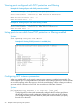

Viewing ports configured with PVST protection and filtering
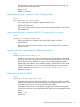
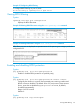
Example 63 Viewing all ports with PVST protection enabled
HP Switch(config)#: show spanning-tree pvst-protection
Status and Counters - PVST Port(s) BPDU Protection Information
BPDU Protection Timeout (sec) : 0
PVST Protected Ports : 5-6
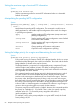
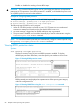
Example 64 Viewing all ports with PVST filtering enabled
HP Switch(config)#: show spanning-tree pvst-filter
Status and Counters - PVST Port(s) BPDU Filter Information
PVST Filtered Ports : 8
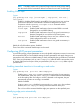
Listing ports to see which have PVST protection or filtering enabled
Syntax:
show spanning-tree port-list detail
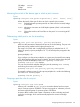
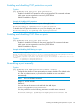
Example 65 Viewing if PVST protection is enabled (Yes)
Configuring MST instance parameters
When you enable MSTP on the switch, a spanning tree instance is enabled automatically. The
switch supports up to 16 configurable MST instances for each VLAN group that you want to operate
as an active topology within the region to which the switch belongs. When creating an instance,
you must include a minimum of one VID. You can add more VIDs later if desired.
Syntax:
[no] spanning-tree instance 1..16 vlan vid [vid..vid]
Configuring MSTP on the switch automatically configures the IST instance and places
all statically and dynamically configured VLANs on the switch into the IST instance.
This command creates a new MST instance (MSTI) and moves the VLANs you specify
from the IST to the MSTI.
90 Multiple instance spanning tree operation