
Advanced Traffic Management Guide K/KA/KB.15.15




Configuring MST instance per-port parameters
Assigning a port cost for an MST instance
Syntax:
spanning-tree instance ist | 1..16 port-list path-cost [ auto
| 1..200000000 ]
Assigns an individual port cost for the IST or for the specified MST instance.
For a given port, the path cost setting can be different for different MST instances
to which the port may belong. The switch uses the path cost to determine which
ports are the forwarding ports in the instance; that is, which links to use for the
active topology of the instance and which ports to block.
The settings are either auto or in a range from 1 to 200,000,000. With the auto
setting, the switch calculates the path cost from the link speed:
10 Mbps 2000000
100 Mbps 200000
1 Gbps 20000
Default Auto
Setting the priority for a port in a specified MST instance
Syntax:
spanning-tree instance 1..16 port-list priority priority-multiplier
Sets the priority for the specified ports in the specified MST instance.
For a given port, the priority setting can be different for different MST instances to
which the port may belong. The priority range for a port in a given MST instance
is 0 - 255. However, this command specifies the priority as a multiplier (0 - 15) of
16. When you specify a priority multiplier of 0 - 15, the actual priority assigned
to the switch is: (priority-multiplier) x 16
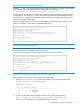
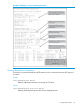
Example 66 Setting priority for a port in a specified MST instance
If you configure 2 as the priority multiplier on a given port in an MST instance, then the actual
Priority setting is 32x. After you specify the port priority multiplier in an instance, the switch displays
the actual port priority and not the multiplier in the show spanning-tree instance 1..16
or show spanning-tree port-list instance 1..16 displays.
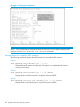
You can view the actual multiplier setting for ports in the specified instance by executing show
running and looking for an entry in the following format:
spanning-tree instance 1..15 port-list priority priority-multiplier
For example, configuring port A2 with a priority multiplier of 3 in instance 1, results in this line in
the show running output:
spanning-tree instance 1 A2 priority 3
Setting the priority for specified ports for the IST
Syntax:
spanning-tree port-list priority priority-multiplier
Sets the priority for the specified ports for the IST (Instance 0) of the region in which
the switch resides.
92 Multiple instance spanning tree operation