
HP Power over Ethernet (PoE/PoE+) Planning and Implementation Guide



13-44
Planning and Implementation for the HP 5400zl/8200zl Switches
Configuration Examples
HP 5412zl/8212zl Configurations using the
Power Supply Shelf
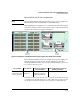
The Power Supply Shelf can be connected to the HP 5412zl/8212zl Switch to
supply extra or redundant PoE power to the PoE modules installed in the
switch.
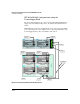
Either EPS port on the Power Supply Shelf can be connected to either EPS
port on the switch. To avoid confusion, it is recommended that EPS 1 of the
Power Supply Shelf be connected to EPS 1 of the switch.
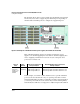
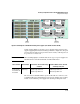
Figure 13-21.Connecting the EPS to one HP 5412zl Switch
To Power
Source
EPS Cables
To Power
Source
5412zl
To Power
Source
To P o we r
Source
EPS 2
EPS 1
EPS 2
EPS 1