
HP Power over Ethernet (PoE/PoE+) Planning and Implementation Guide





9-6
Planning and Implementation for the HP 2920-PoE+ Switches
Planning the PoE Configuration
Backup power (RPS) and extra PoE/PoE+ power can be provided by
connecting an HP 640 RPS/EPS Shelf to the switch. The same PoE+ power
supplies that you install in the HP 2920 Switches can be installed in the HP
640. For more information on the HP 640, see Table 9-2 on page 9-4 and Table
9-3 on page 9-4, and see the HP 640 RPS/EPS Shelf Installation and Power
Setup Guide, which can be found on the web site www.hp.com/networking/
support. Auto search on “640”, select the 640 from the list, click on Display
selected, and then click on the links that have the word “manuals” in them to
get to the manuals web page.Also see
HP 2920-24G-PoE+ Configurations
.
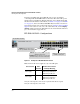
Figure 9-1. Example of an HP 2920-24G-PoE+ Switch
Note: PoE or PoE+ is not supplied to any of the SFP ports.
1
Any 12 of the 24 ports can be used, not just the first block of ports.
2
Any 23 of the 24 ports can be used.
HP 2920-24G-PoE+ Switch
575W PSU: Any 23 of the ports can receive up to
15.4 Watts of PoE+ power.
1050W PSU: Any 23 of the ports can receive up to
30 Watts of PoE+ power. See the table below
2
All 24 ports can receive up to
7.5 Watts of PoE+ power
575W PSU: Any 12 of the ports can
receive up to 30 Watts of PoE+ power
1
Source of Power Watts
Available
Number of Ports Powered
and Average Watts/Port
Internal 575W PoE+
Power Supply
370 12 @ average 30 W each
1
23 @ average 15.4 W each
2
24 @ average 7.5 W each
Internal 1050W PoE+
Power Supply
740 23 @ average 30 W each
2
24 @ average 15.4 W each
24 @ average 7.5 W each