
HP Switch zl2 Modules Installation Guide




5
Network Interface Module LEDs
Network Interface Module LEDs
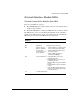
Network Connectivity Modules Port LEDs
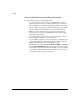
There are two LEDs for each port:
■ The Link LED lights green with a valid connection and orange if there is
a fault or alert condition.
■ The Mode LED lights according to the LED mode selected on the chassis.
The LED mode is selected on the Management Module for the 5400R zl2
switches,. The LED mode that is selected is indicated by the following five
LEDs that are located near the LED mode selection button.
Network Ports Mode
LED Display
Description
Act Activity Transmit or receive traffic present
FDx Full Duplex Full duplex mode of operation
Spd Indicates the Port
LEDs are displaying
the connection
speed at which each
port is operating.
• If the Port LED is on continuously, the
port is operating faster than 1 Gbps.
• If the Port LED is flashing, the port is
operating at 1 Gbps.
• If the Port LED is off, the port is
operating at 10/100 Mbps.
PoE Power over Ethernet • If the Mode LED is on, the port is
providing PoE power.
• If the Mode LED is off, the port is not
providing PoE power.
• If the Link LED is on, the port is enabled
for PoE.
• If the Link LED is off, the port is disabled
for PoE.
• If the Link LED is flashing, the port has
an error or the port is denied power due
to insufficient power.
Usr For future development