
HP Switch zl2 Modules Installation Guide





14
Installing the Modules
Verifying the Module is Installed Correctly
Observe the Module Status LED for the slot in which the module is being
installed, and the Test and Fault LEDs on the switch to verify the module is
installed properly.
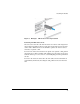
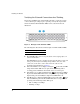
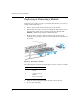
Figure 6. Module Status LEDs on an 5400R zl2 switch
The following table shows the label and description for 5400R zl2 switch with
LED status as ON:
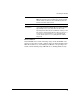
When the module is installed properly and the switch is powered on, or the
module is installed when the switch already has power, the module undergoes
a self test that takes a few seconds. You can use the LEDs to determine that
the module is installed properly and has passed the self test, as described in
the “LED Behavior” table below.
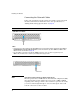
LED Behavior
Label Description
1 Fault LED
2 Module Link and Mode
LEDs
3 Module Status LEDs
LED Display for a Properly Installed Module
Module Status (for the slot in which you are installing the module) The LED goes
ON as soon as the module is installed and the switch is powered on,
and stays ON steadily.