
HP Switch zl2 Modules Installation Guide





15
Installing the Modules
Error Condition
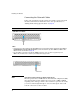
If the Link LED on the module is flashing orange and the Fault LED on the
switch is on, then there is a fault condition on the port with the flashing orange
LED. The module letter, on the Management Module corresponding to the
module with the flashing orange LED will also be flashing simultaneously.
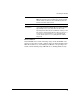
Test ON briefly while the module is being tested, then OFF.
Note: If the switch was powered off while the module was installed,
when the switch is powered on, the Test LED will stay ON for the
duration of the whole switch self test.
Fault OFF
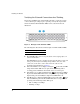
Link and Mode (on
the modules)
For a module that is installed when the switch is already powered
on (hot swap), all the Link and Mode LEDs on the module go ON for
approximately 3 to 10 seconds, then OFF for 5 to 10 seconds
depending on the module. Then, the Test LED on the switch goes OFF.
If the module is already installed when the switch is powered on or
reset, the process described above occurs approximately 30
seconds after the power on or reset, during which the switch is
being tested.