
HP Switch zl2 Modules Installation Guide





19
Installing the Modules
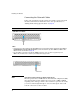
• On = >1 Gbps
• If the port is in AUTO, the spd mode LED will be off.
Default Port Configuration
If the slot in which you installed the module was empty the last time the switch
was either rebooted or reset (or the power to the switch was cycled), then the
module will use preconfigured default parameter values that will work for
most networks.
The default port configurations for connection parameters are:
■ Ports Enabled: Yes
■ Mode:
• 10/100/1000-T v2zl Modules: Auto — The port auto negotiates
speed (10, 100 or 1000 Mbps), communication mode (half or full
duplex), and MDI or MDI-X port operation.
Note If you configure the port to one of the fixed 100 Mbps modes, the port will
then operate only as an MDI-X port.
Gigabit-SX, Gigabit-LX, and Gigabit-LH ports in SFP v2 zl Module: Auto
— The port always operates at 1000 Mbps and full duplex. The setting is Auto
for best link establishment with other devices.
■ Flow Control: Disabled
■ Advanced features — Spanning Tree, Trunking, Meshing, VLANs, IGMP,
LACP, Routing, Class of Service, Security, and so forth: all Disabled
If necessary, configure the port(s) in the module by using the switch console
or the web browser interface. For more information, see the Management and
Configuration Guide for your switch at
www.hp.com/networking/support, and
the online Help provided in the console and web browser interfaces. If the
default port configuration listed above is acceptable for your network, then
skip this process.