
IPv6 Configuration Guide K/KA/KB.15.15


Syntax:
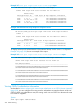
[no] ip load-sharing 2 - 4
When OSPF is enabled and multiple, equal-cost, next-hop routes are available for
traffic destinations on different subnets, this feature, by default, enables load-sharing
among up to four next-hop routes.
2 - 4
Specifies the maximum number of equal-cost next-hop paths the router allows.
Default: Enabled with four equal-cost, next-hop routes allowed
The no form of the command disables this load-sharing so that only one route in a
group of multiple, equal-cost, next-hop routes is used for traffic that could otherwise
be load-shared across multiple routes.
NOTE: Disabling load-sharing means that router "1" selects only one next-hop
router for traffic that is actually eligible for load-sharing through different next-hop
routers.
In the default configuration, load-sharing is enabled by default for both IPv4 and
IPv6. However, it has no effect unless routing and OSPF are enabled.
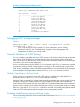
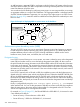
For example, in Figure 22 (page 246), the next-hop routers "B," "C," and "D" are available for
equal-cost load-sharing of eligible traffic. Disabling IP load-sharing means that router "A" selects
only one next-hop router for traffic that is actually eligible for load-sharing through different next-hop
routers.
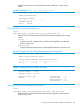
In Figure 22 (page 246), the ECMP inter-area routes to destination network 2001:db8:0:e::/64
consist of the following next-hop gateway addresses:
• 2001:db8:0:b::b:101
• 2001:db8:0:c::c:101
• 2001:db8:0:d::d:101
Figure 22 OSPFv3 ECMP multiple next-hop routing (inter-area)
However, the forwarding software distributes traffic across the three possible next-hop routes in
such a way that all traffic for a specific host is sent to the same next-hop router.
246 OSPFv3 Routing