
Multicast and Routing Guide K/KA/KB.15.15

Viewing static route information
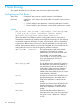
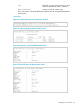
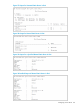
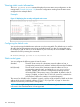
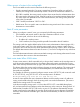
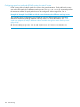
The show ip route static command displays the current static route configuration on the
routing switch. Example 64 (page 128) shows the configuration resulting from the static routes
configured in the example above.
Example:
Figure 31 Displaying the currently configured static routes
Configuring the default route
You can also assign the default route and enter it in the routing table. The default route is used for
all traffic that has a destination network not reachable through any other IP routing table entry.
For example, if 208.45.228.35 is the IP address of your ISP router, all non-local traffic could be
directed to the ISP by entering this command:
HP Switch(config)# ip route 0.0.0.0/0 208.45.228.35
Static route types
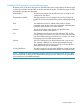
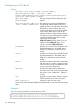
You can configure the following types of static IP routes:
Standard The static route consists of a destination network address or host, a
corresponding network mask, and the IP address of the next-hop IP address.
Null (discard) The null route consists of the destination network address or host, a
corresponding network mask, and either the reject or blackhole
keyword. Typically, the null route is configured as a backup route for
discarding traffic if the primary route is unavailable. By default, when IP
routing is enabled, a route for the 127.0.0.0/8 network is created to the
null interface. Traffic to this interface is rejected (dropped.)
This route is for all traffic to the "loopback" network, with the single exception of traffic to the host
address of the switch's loopback interface (127.0.0.1/32.) Figure A-3 on page 1-6 shows the
default null route entry in the switch's routing table.
NOTE: On a single routing switch you can create one null route to a given destination. Multiple
null routes to the same destination are not supported.
126 Static Routing