
Multicast and Routing Guide K/KA/KB.15.15

Syntax:
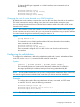
[no] ip rip poison-reverse
Poison reverse is enabled by default. Disabling Poison reverse causes the routing
switch to revert to Split horizon. (Poison reverse is an extension of Split horizon.)
To disable Poison reverse on an interface, and thereby enable Split horizon, enter
the following:
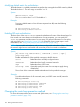
HP Switch(config)# vlan 1
HP Switch(vlan-1)# no ip rip poison-reverse
Entering the command without the no option re-enables Poison reverse.
Viewing RIP information
All RIP configuration and status information is shown by the CLI command show ip rip and
options off that command.
Viewing general RIP information
Syntax:
show ip rip
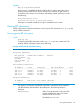
To display general RIP information, enter show ip rip at any context level. The
resulting display will appear similar to the following:
Example 69 General RIP information listing
HP Switch(config)# show ip rip
RIP global parameters
RIP protocol : enabled Auto-summary : enabled
Default Metric : 4
Distance : 120
Route changes : 0
Queries : 0
RIP interface information
IP Address Status Send mode Recv mode Metric Auth
--------------- ----------- ---------------- ---------- ----------- ----
100.1.0.1 enabled V2-only V2-only 5 none
100.2.0.1 enabled V2-only V2-only 5 none
100.3.0.1 enabled V2-only V2-only 5 none
100.4.0.1 enabled V2-only V2-only 5 none
RIP peer information
IP Address Bad routes Last update timeticks
--------------- ----------- ---------------------
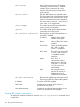
The display is a summary of global RIP information, information about interfaces
with RIP enabled, and information about RIP peers. The following fields are
displayed:
RIP protocol Status of the RIP protocol on the router. RIP
must be enabled here and on the VLAN
interface for RIP to be active.
The default is disabled.
Viewing RIP information 133