
Multicast and Routing Guide K/KA/KB.15.15

Examples of changing per-interface settings
Suppose that VLAN 30 is multinetted, with two subnets in area 1 and one subnet in area 5:
vlan 30
ip ospf 10.10.30.1 area 0.0.0.1
ip ospf 10.10.31.1 area 0.0.0.1
ip ospf 10.10.32.1 area 0.0.0.5
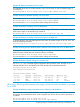
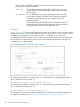
If you wanted to quickly reconfigure per-interface OSPF settings for VLAN 30, such as those listed
below, you could use the commands shown in Figure “Reconfiguring per-interface settings in a
multinetted VLAN” (page 158).
• Assign a cost of "5" to the two subnets in area 1 and a cost of "10" to the subnet in area 5.
• Assign a dead interval of 45 seconds to the subnets in area 1 and retain the default setting
(40 seconds) for the subnet in area 5.
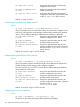
Figure 34 Reconfiguring per-interface settings in a multinetted VLAN
Configuring OSPF interface authentication
Optional: For more information, see “Configuring OSPF interface authentication” (page 202).
Configuring OSPF password authentication
Syntax:
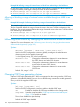
ip ospf [ip-address] authentication-key key-string
no ip ospf [ip-address] authentication
Used in the VLAN interface context to configure password authentication for all
interfaces in the VLAN or for a specific subnet. The password takes effect
immediately, and all OSPF packets transmitted on the interface contain this
password. All OSPF packets received on the interface are also checked for the
password. If it is not present, the packet is dropped.
To disable password authentication on an interface, use the no form of the
command.
For the 5400zl and 8200zl switches, when the switch is in enhanced secure mode,
commands that take a secret key as a parameter have the echo of the secret typing
replaced with asterisks. The input for key-string is prompted for interactively.
For more information, see the Access Security Guide for your switch.
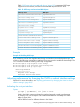
ip-address Used in subnetted VLAN contexts where you want to assign or
remove a password associated with a specific subnet.
Omit this option when you want the command to apply to all
interfaces configured in the VLAN.
key-string An alphanumeric string of one to eight characters. (Spaces are
not allowed.)
To change the password, re-execute the command with the new
password.
158 Open Shortest Path First Protocol (OSPF)