
Multicast and Routing Guide K/KA/KB.15.15
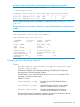
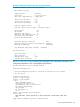
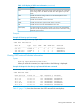

HP Switch(ospf)# area 1 virtual-link 10.0.0.1 hello-interval
60
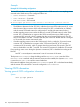
Configuring OSPF authentication on a virtual link
For more information, see “Configuring OSPF authentication on a virtual link” (page 203).
Authenticating the OSPF password on a virtual link
Syntax:
area area-id virtual-link ip-addr authentication-key
key-string no area 1 virtual-link ip-address authentication
Used to configure password authentication in the router OSPF context on both ABRs
in a virtual link. The password takes effect immediately, and all OSPF packets
transmitted on the link contain this password. Every OSPF packet received on the
interface for the virtual link on each ABR is checked for the password. If it is not
present, the packet is dropped.
To disable password authentication on an ABR interface used for a virtual link, use
the no form of the command.
The password must be the same on both ABRs on a given virtual link.
NOTE: For the 5400zl and 8200zl switches, when the switch is in enhanced
secure mode, commands that take a secret key as a parameter have the echo of
the secret typing replaced with asterisks. The input for key-string is prompted
for interactively. For more information, see the Access Security Guide for your
switch.
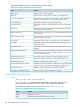
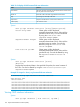
area-id Specifies the OSPF area in which both ABRs in a given virtual link
operate. In this use, the area ID is sometimes termed "transit area
ID." This value must be the same for both ABRs in the virtual link.
ip-address For an ABR in a given virtual link, this is the IP address used to
create the link on that ABR. (This IP address matches the IP address
of the interface on the opposite end of the virtual link. See the
description of ip-address in the syntax description under
“Configuring a virtual link” (page 159).)
key-string An alphanumeric string of one to eight characters. (Spaces are
not allowed.)
To change the password, re-execute the command with the new
password.
NOTE: To replace the password method with the MD5 method on a given
interface, overwrite the password configuration by using the MD5 form of the
command shown in “Authenticating OSPF MD5 on a virtual link” (page 163). (It is
not necessary to disable the currently configured OSPF password.)
Default: Disabled
Authenticating OSPF MD5 on a virtual link
Syntax:
ip ospf md5-auth-key-chain chain-name-string no ip ospf
[ip-address]
authentication
Configuring OSPF authentication on a virtual link 163