
Multicast and Routing Guide K/KA/KB.15.15
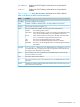
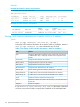
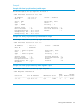
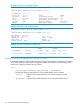
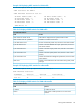
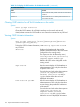
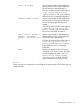
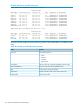
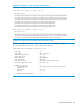
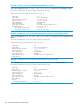

Table 19 CLI display of OSPF statistics for VLAN subnet traffic (continued)
Per-subnet OSPF statistics
ContentField
Total number of OSPF packets received on each subnet
interface.
Total Rx
Total number of errors in OSPF packet transmission on
each subnet interface.
Total Errors
Clearing OSPF statistics for all VLAN interfaces on the switch
Syntax:
clear ip ospf statistics
Clears the OSPF statistics for all VLAN interfaces on the switch and sets all
VLAN/subnet counters for OSPF traffic to zero. Enter the command at any CLI level.
Viewing OSPF link-state information
Syntax:
show ip ospf link-state [status] [subsetoptions] [advertise
[subset-options]] [detail]
To display OSPF link state information, enter show ip ospf link-state at
any CLI level.
advertise Displays the hexadecimal data in LSA
packets (advertisements) for the OSPF areas
configured on the routing switch.
The output can also be filtered by area (
area-id), link-state-id, router-id,
sequence-number, and/or type.
Default: All OSPF areas configured on the
routing switch.
ospf-area-id Used to restrict display of LSA database or
advertisements to show only the data from
a specific OSPF area.
Can also be used with other subset options
( router-id, sequence-number,
external link-state-id, and/or
type) to further define the source of
displayed information.
link-state-id ip-addr Used to restrict display of LSA database or
advertisements to show only the data from
sources having the specified IP address as
a link-state ID.
Can also be used with other subset options
( ospf-area-id, router-id,
sequence-number, external
link-state-id, and type) to further
define the source of displayed information
176 Open Shortest Path First Protocol (OSPF)