
Multicast and Routing Guide K/KA/KB.15.15
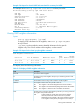
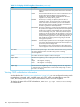
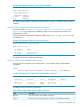
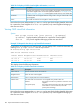
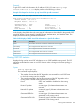
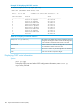
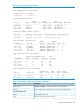
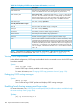

Table 22 CLI display of OSPF virtual neighbor information (continued)
DescriptionField
The state of the adjacency with this virtual neighbor. The possible values are the same
as the OSPF neighbor states. See the State parameter definition in “CLI display of OSPF
neighbor information” (page 181). Virtual neighbors should never stay in the 2WAY state.
State
IP address of the virtual neighbor that the routing switch is using to communicate to that
virtual neighbor.
IP Address
The number of times the virtual neighbor's state has changed.Events
Notice from the syntax statement that ip-address can be specified to display detailed information
for a particular virtual neighbor. If an area-id is specified, only virtual neighbors belonging to
that area are shown.
Viewing OSPF virtual link information
Syntax:
show ip ospf virtual-link [[area area-id] | [ip-address]]
ip-address Displays detailed information for a particular virtual neighbor.
area-id Only virtual neighbors belonging to that area are shown.
Example 119 Output for the show ip ospf virtual-link command
If virtual links are configured on a routing switch, you can display OSPF virtual link information by
entering show ip ospf virtual-link at any CLI level.
HP Switch# show ip ospf virtual-link
OSPF Virtual Interface Status
Transit AreaID Neighbor Router Authentication Interface State
--------------- --------------- --------------- ---------------
10.3.16.0 10.0.8.33 none P2P
10.3.16.0 10.0.8.36 none P2P
This display shows the following information.
Table 23 CLI display of OSPF virtual link information
DescriptionField
Area ID of transit area for the virtual link.Transit Area ID
Router ID of the virtual neighbor.Neighbor Router
none or simple (same as for normal interface.)Authentication
The state of the virtual link to the virtual neighbor. The possible values are:Interface State
DOWN The routing switch has not yet found a route to the virtual
neighbor.
P2P (point-to-point) The routing switch has found a route to the virtual neighbor.
Virtual links are "virtual" serial links, hence the
point-to-point terminology.
Notice from the syntax statement that ip-address can be specified to display detailed information
for a particular virtual neighbor. If an area-id is specified, only virtual neighbors belonging to
that area are shown.
184 Open Shortest Path First Protocol (OSPF)