
Multicast and Routing Guide K/KA/KB.15.15

When OSPF is enabled and multiple, equal-cost, next-hop routes are available for
traffic destinations on different subnets, this feature, by default, enables load-sharing
among up to four next-hop routes.
1 - 4 : Specifies the maximum number of equal-cost next-hop paths the router
allows.
Default: 4; range: 2–4
The no form of the command disables this load-sharing so that only one route in a
group of multiple, equal-cost, next-hop routes is used for traffic that could otherwise
be load-shared across multiple routes.
For example, in Figure 43 (page 204), the next-hop routers "B", "C", and "D" are
available for equal-cost load-sharing of eligible traffic. Disabling IP load-sharing
means that router "A" selects only one next-hop router for traffic that is actually
eligible for load-sharing through different next-hop routers.
Default: Enabled with four equal-cost, next-hop routes allowed.
NOTE: This command enables or disables load-sharing for both IPv4 (OSPFv2)
and IPv6 (OSPFv3) operation. For more information, see the IPv6 Configuration
Guide for your switch.
In the default configuration, IP load-sharing is enabled by default. However, it has
no effect unless IP routing and OSPF are enabled.
Viewing the current IP load-sharing configuration
Use the show running command to view the currently active IP load-sharing configuration, and
show config to view the IP load-sharing configuration in the startup-config file. (While in its
default configuration, IP load-sharing does not appear in the command output.)
If IP load sharing is configured with non-default settings (disabled or configured for either two or
three equal-cost next-hop paths), the current settings are displayed in the command output.
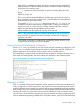
Figure 36 Displaying a non-default IP load-sharing configuration
Overview of OSPF
OSPF is a link-state routing protocol applied to routers grouped into OSPF areas identified by the
routing configuration on each routing switch. The protocol uses LSAs transmitted by each router to
update neighboring routers regarding its interfaces and the routes available through those interfaces.
Each routing switch in an area also maintains a link-state database (LSDB) that describes the area
topology. (All routers in a given OSPF area have identical LSDBs.) The routing switches used to
connect areas to each other flood summary link LSAs and external link LSAs to neighboring OSPF
areas to update them regarding available routes. Through this means, each OSPF router determines
Overview of OSPF 189