
Multicast and Routing Guide K/KA/KB.15.15
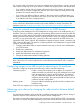
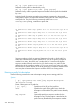
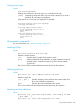
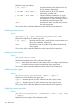
ip prefix-list Even: Count:4, Range-entries: 4,
Sequences: 5 - 20
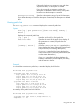
A detailed display of one of the prefix lists looks like this:
HP Switch# show ip prefix-list name Even detail
ip prefix-list Even: Count:4, Range-entries: 4,
Sequences: 5 - 20
seq 5 deny 10.1.1.1/24 ge 24 le 24
Description: Permit even-numbered subnets
seq 10 permit 10.1.2.1/24 ge 24 le 24
seq 15 deny 10.1.3.1/24 ge 24 le 24
seq 20 permit 10.1.4.1/24 ge 24 le 24
Creating a route map
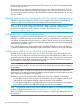
The route-map command creates a route map sequence. It specifies a route map name, a permit
or deny instruction, and, optionally, a sequence number. All sequences that have the same route
map name belong to the same route map. For more information, see “Route maps” (page 212).
Syntax:
route-map name [ permit | deny ] [seq seq-num]
Creates a route map and enters the route map context.
name Specifies the name of the route map.
permit Instructs the policy engine to permit the route if the match
succeeds.
deny Instructs the policy engine to deny the route if the match succeeds.
seq seq-num Specifies a sequence number for the route-map. If a sequence
number is not specified at the first instance of the route-map
name command, the switch uses a default value of 10.
Deleting all or part of a route map
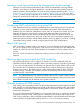
Use The no form of the route-map command to delete a sequence or an entire route map.
Syntax:
no route-map name [seq seq-num]
Deletes a route map or a route map sequence.
name Specifies the name of the route map.
seq seq-num Optional sequence number. Specifies a sequence to delete from
the named route map.
If no sequence number is specified, the entire route map is
deleted.
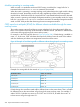
To delete a match or set clause from a route-map, first enter the context of that
route map and then issue The no form of the clause to delete it.
Example
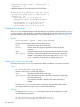
To delete the match metric 25 clause from sequence 20 of Map4, you would
use the following commands:
HP Switch(config)# route-map Map4 permit seq 20
HP Switch(route-map-Map4-20)# no match metric 25
208 Route Policy