
Multicast and Routing Guide K/KA/KB.15.15
Viewing route maps
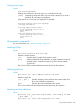
Syntax:
show route-map [name]
Displays the commands in all route maps or in a specified route map.
[name] Optionally specifies the name of a route map to display. If no name is
specified, all route maps are displayed.
All sequences of a route map are displayed. For example:
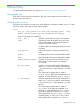
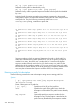
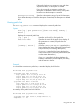
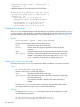
HP Switch(config)# show route-map Map3
Routemap information
route-map "Map3" permit seq 10
match interface vlan 11 12 13
match metric 25
exit
route-map "Map3" permit seq 20
match interface vlan 21 22 23
match metric 25
exit
Using match commands
For more information, see “Match commands” (page 214).
Matching VLANs
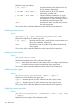
Syntax:
[no] match interface vlan vid [vid]...
Matches a VLAN interface.
vid Specifies the ID number of the VLAN to match.
[vid]... Optional additional VLAN identifiers. A single command can specify
multiple VLANs. A match succeeds if any of the VLANs matches
(logical OR.)
The no form of the command deletes the match clause from the sequence.
Matching prefix lists
Syntax:
[no] match [ ip | ipv6 ] address prefix-list name
Matches a prefix list.
[ ip | ipv6 ] Specifies matching with a prefix list that contains either IPv4
(IP) or IPv6 addresses, respectively.
name Specifies the name of the prefix list to match.
The no form of the command deletes the match clause from the sequence.
Matching next-hop addresses
Syntax:
[no] match [ ip | ipv6 next-hop IP-addr | IPv6-addr ] [ IP-addr
| IPv6-addr ...]
[no] match [ ip | ipv6 ] next-hop prefix-list name
Using match commands 209