
Multicast and Routing Guide K/KA/KB.15.15

The no form of the command deletes the set clause from the sequence.
Setting the tag value
Syntax:
[no] set tag value
Sets the tag value of the route.
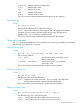
value Value of the route tag. This is an integer value between 0 and the
maximum number supported by the routing switch.
The no form of the command deletes the set clause from the sequence.
Route policy overview
The route table in a routing switch contains routing paths to IP destinations. The traditional sources
of the routing paths are:
• Directly connected destinations (no router hops)
• Static routes (manually configured by a network administrator)
• Routing protocols such as RIP or OSPF
Route policy provides an additional method for controlling entries in the route table. This approach
applies predetermined policies to define how the routing switch accepts routes from peers,
propagates routes to peers, and redistributes routes between different protocols. Route policy can
often provide finer control and greater flexibility over route table entries than traditional methods.
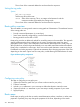
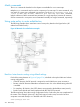
Route policy is embodied in route maps, which are used to match destination routes according to
IP addresses and other parameters. Optional set statements allow changing properties of the route
depending on the match. Typical uses for route policy include filtering and redistribution of routes.
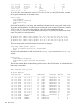
Figure 44 Route policy components
Configuring route policy
The steps in configuring a route policy are:
1. (Optional) Create any prefix lists you will use to select routes for your policy.
2. Create a route map.
3. Include match statements in your route map to define the selection criteria for routes.
4. (Optional) Include set statements in your route map to modify properties of your routes.
5. Apply the policy.
Route maps
Route maps are policy tools that are used to match destination prefixes, interfaces, or other route
properties. Optionally, they may change the properties of the route, depending on the match.
212 Route Policy