
Multicast and Routing Guide K/KA/KB.15.15
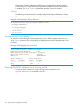

Example 131 Using the CLI to view the switch MAC address
HP Switch(config)# show system information
Status and Counters - General System Information
System Name : HP Switch
System Contact :
System Location :
MAC Age Time (sec) : 300
Time Zone : 0
Daylight Time Rule : None
Software revision : K.15.06.0000x Base MAC Addr : 00110a-a50c20
ROM Version : K.15.13 Serial Number : LP713BX00E
Allow V1 Modules : No
Up Time : 32 days Memory - Total : 128,839,680
CPU Util (%) : 0 Free : 65,802,416
IP Mgmt - Pkts Rx : 5,372,271 Packet - Total : 6750
Pkts Tx : 298,054 Buffers Free : 5086
Lowest : 4441
Missed : 0
Configuring Option 82
For information on Option 82, see the sections beginning with “DHCP Option 82” (page 238).
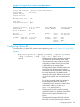
Syntax:
dhcp-relay option 82 [ append [validate] | replace [validate]
| drop [validate] | keep ] [ ip | mac | mgmt-vlan ]
append Configures the switch to append an Option
82 field to the client DHCP packet. If the
client packet has existing Option 82 fields
assigned by another device, the new field
is appended to the existing fields.
The appended Option 82 field includes the
switch Circuit ID (inbound port number*)
associated with the client DHCP packet and
the switch Remote ID. The default switch
remote ID is the MAC address of the switch
on which the packet was received from the
client.
To use the incoming VLAN's IP address or
the Management VLAN IP address (if
configured) for the remote ID instead of the
switch MAC address, use the ip or
mgmt-vlan option (below.)
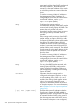
replace Configures the switch to replace existing
Option 82 fields in an inbound client DHCP
packet with an Option 82 field for the
switch.
The replacement Option 82 field includes
the switch circuit ID (inbound port number*)
Configuring Option 82 233