
Multicast and Routing Guide K/KA/KB.15.15
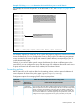
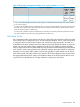
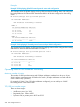
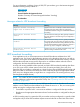

Example 132 Using walkmib to determine the circuit ID for a port on an HP chassis
For example, the circuit ID for port B11 on an HP switch is "35”, see Example 132 (page 241),
below.
HP Switch# walkmib ifname
ifName.1 = A1
ifName.2 = A2
ifName.3 = A3
ifName.4 = A4
ifName.25 = B1
ifName.26 = B2
ifName.27 = B3
ifName.28 = B4
ifName.29 = B5
ifName.30 = B6
ifName.31 = B7
ifName.32 = B8
ifName.33 = B9
ifName.34 = B10
ifName.35 = B11
ifName.36 = B12
ifName.37 = B13
ifName.38 = B14
ifName.39 = B15
ifName.40 = B16
ifName.41 = B17
ifName.42 = B18
ifName.43 = B19
-- MORE --, next page: Space, next line: Enter, quit: Control-C
In this example, the switch has a 4-port module
installed in slot "A" and a 24-port module installed in
slot "B". Thus, the first port numbers in the listing are
the Index numbers reserved for slot "A". The first
Index port number for slot "B" is "25", and the Index
port number for port B11 (and therefore the Circuit ID
number) is "35".
The Index (and Circuit ID) number for port B11
on the routing switch.
For example, suppose you want port 10 on a given relay agent to support no more than five DHCP
clients simultaneously. You can configure the server to allow only five IP addressing assignments
at any one time for the circuit ID (port) and remote ID (MAC address) corresponding to port 10
on the selected relay agent.
Similarly, if you want to define specific ranges of addresses for clients on different ports in the
same VLAN, you can configure the server with the range of IP addresses allowed for each circuit
ID (port) associated with the remote ID (IP address) for the selected VLAN.
Forwarding policies
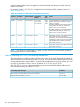
DHCP Option 82 on HP switches offers four forwarding policies, with an optional validation of
server responses for three of the policy types (append, replace, or drop.)
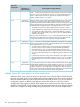
Configuration options for managing DHCP client request packets:
DHCP client request packet inbound to the routing switchOption 82
configuration
Packet includes an Option 82 fieldPacket has no
Option 82 field
Append allows the most detail in defining DHCP policy boundaries. For example,
where the path from a client to the DHCP Option 82 server includes multiple relay
Append an
Option 82 field
Append
agents with Option 82 capability, each relay agent can define a DHCP policy
boundary and append its own Option 82 field to the client request packet. The
server can then determine in detail the agent hops the packet took, and can be
configured with a policy appropriate for any policy boundary on the path.
DHCP Option 82 241