
Multicast and Routing Guide K/KA/KB.15.15

Default: Disabled
Syntax:
[no] router vrrp traps
Enables or disables SNMP trap generation for the following events:
New master Indicates that the sending router has transitioned
to 'master' state.
Authentication Failure Indicates that a VRRP packet has been received
from a router whose authentication key or
authentication type conflicts with this router's
authentication key or authentication type.
NOTE: This feature assumes the snmp-server host command has been used
to configure a a trap receiver. If a VRRP packet is received with an authentication
type other than 0 (zero, that is, no authentication), the packet is dropped.
Default: Enabled
Example
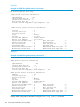
Example 135 Enabling and displaying the global VRRP configuration
The following commands enable VRRP at the global configuration level and then display the current
global VRRP configuration:
HP Switch(config)# router vrrp
HP Switch(config)# show vrrp config global
VRRP Global Configuration Information
VRRP Enabled : Yes
Traps Enabled : Yes
Creating a VR and entering the VR context
Syntax:
[no] vrrp [ ipv6 ]
vrid 1-255
Used in the VLAN interface context to create a virtual router (VR) instance and to
enter the context of the new VR. It is also used to enter the context of an existing
VR, and is the method used for accessing a VR for configuration purposes. You can
configure up to 32 VRs on a multinetted VLAN.
The VLAN interface must be IP enabled for IPv4, and IPv6 enabled for IPv6.
Example:
To create VR 1 in VLAN 10 and enter the VR context, execute the following command:
HP Switch(vlan-10)# vrrp vrid 1
HP Switch(vlan-10-vrid-1)#
Selecting a Version of VRRP
The version command is configured in the IPv4 VR context. IPv4 virtual routers support VRRPv2 and
VRRPv3. IPv6 virtual routers support only VRRPv3.
The default is version 2. The show running-config command will display the version only
when it is set at the non-default value of version 3 for IPv4.
252 Virtual Router Redundancy Protocol (VRRP)