
Multicast and Routing Guide K/KA/KB.15.15

If an update is performed from a software version that only supported VRRPv2, all the IPv4 VRs
remain in VRRPv2 mode.
Syntax:
version 2|3
Example:
HP Switch(vlan-10-vrid-1)# version 3
Configuring a VR instance on a VLAN interface
This section describes the configuration and activation commands available in the VR context.
Configuring a virtual IP address (VIP) in a VR
The VIP must be the same for the owner and all backups on the same network or subnet in a VR.
The decision about the VIP being an owner or backup is based on the whether the VIP is a
configured IP address or not. If the VIP is a configured IP address, it becomes the owner and the
priority becomes 255. For backup VRs, the priority is between 1–254.
Syntax:
virtual-ip-address ipv4-addr
virtual-ip-address ipv6-addr
Used in a VR context of a VLAN to assign an IPv4 address for IPv4, or an IPv6
address for IPv6, to a VR instance.
Note: This command had a subnet option in prior versions. This is not needed
now because the subnet is provided when the VLAN IP address is configured.
For an owner The VIP must be one of the IP addresses configured on the
VLAN interface for that VR.
For a backup The VIP must match the VIP for the owner.
The owner and the backups using a given VIP must all belong to the same network
or subnet.
For IPv6, you must configure the link-local address before you are able to configure
the global IPv6 address. In the owner VR, this is the link-local address of the interface.
The VR can be enabled only after configuring the first virtual IP address. Additional
IP addresses can be configured without disabling the VR.
When removing virtual IP addresses, when the last virtual IP address is removed,
the VR state is changed to disabled. A warning message is displayed.
NOTE: If the link-local address is changed, the VR configuration is removed. When
an IP address is removed, the virtual IP address in that subnet is removed.
Only IPv6 addresses are processed when in IPv6 context.
Default: None
Example
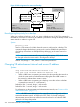
If VLAN 10 on router "A" is configured with an IP address of 10.10.10.1/24 and
VR 1, and you want router "A" to operate as the owner for this VR, the VIP of the
owner in VR 1 on router "A" is also 10.10.10.1/24. On router "B," which will
operate as a backup for VR 1, VLAN 10 is configured (in the same network) with
an IP address of 10.10.10.15/24. However, because the backup must use the
same VIP as the owner, the VIP for the backup configured on router "B" for VR 1
is also 10.10.10.1/24.
Configuring a VR instance on a VLAN interface 253