
Multicast and Routing Guide K/KA/KB.15.15
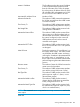

master's IP Address The IP address used as the source IP address
in the last advertisement packet received
from the VR master. If this VR is the master,
this is the primary IP address of the VR. If the
VR is disabled, this value appears as 0.0.0.0
for IPv4, and 0:0:0:0:0:ffff:0:0 for IPv6.
Associated IP Address Count Number of VIPs.
Advertise Packets Rx The number of VRRP master advertisements
the VR has received from other VRRP routers
since the last reboot.
Zero Priority Tx The number of VRRP advertisement packets
received with the priority field set to 0 (zero.)
Bad Length Pkts The number of VRRp packets received with
missing fields of information.
Mismatched Interval Pkts The number of VRRP packets received from
other routers (since the last reboot) with an
advertisement interval that is different from
the interval configured on the current VR.
VRRP packets received with an interval
mismatch are dropped.
Mismatched IP TTL Pkts The number of VRRP packets received with
the IP TTL field not set to 255. Such packets
are dropped.
Near Failovers Tracks the occurrence of "near failovers" on
the backup VRRP routers. This makes visible
any difficulties the VRRP routers are having
receiving the "heartbeat" advertisement from
the master router. A "near failover" is one
that is within one missed VRRP advertisement
packet of beginning the master determination
process.
Become master The number of times the VR has become the
master since the last reboot.
Zero Priority Tx The number of VRRP advertisement packets
sent with the priority field set to 0 (zero.)
Bad Type Pkts The number of VRRP packets received with
packet type not equal to 1 (that is, not an
advertisement packet.)
Mismatched Addr List Pkts The number of VRRP packets received
wherein the list of VIPs does not match the
locally configured VIPs for a VR.
Mismatched Auth Type Pkts The number of VRRP packets received with
the authentication type not equal to 0 (zero,
which is no authentication.)
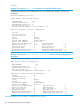
NOTE: The commands show vrrp and show vrrp statistics result in the
same output.
Note that
Viewing VRRP configuration data 269