
Multicast and Routing Guide K/KA/KB.15.15

On switches that do not support data-driven IGMP, unregistered multicast groups are flooded to
the VLAN rather than pruned. In this scenario, fast-leave IGMP can actually increase the problem
of multicast flooding by removing the IGMP group filter before the Querier has recognized the
IGMP leave. The Querier will continue to transmit the multicast group during this short time, and
because the group is no longer registered, the switch will then flood the multicast group to all ports.
On HP switches that do support data-driven IGMP ("Smart" IGMP), when unregistered multicasts
are received the switch automatically filters (drops) them. Thus, the sooner the IGMP leave is
processed, the sooner this multicast traffic stops flowing.
Because of the multicast flooding problem mentioned above, the IGMP fast-leave feature is disabled
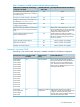
by default on all HP switches that do not support data-driven IGMP (see the table above.) The
feature can be enabled on these switches via an SNMP set of this object:
hpSwitchIgmpPortForceLeaveState.vid.port number
However, HP does not recommend this, because it will increase the amount of multicast flooding
during the period between the client's IGMP leave and the Querier's processing of that leave. For
more information on this topic, see “Forced fast-leave IGMP” (page 29).
If a switch port has the following characteristics, the fast-leave operation will apply:
• Connected to only one end node.
• The end node currently belongs to a multicast group, that is, is an IGMP client.
• The end node subsequently leaves the multicast group.
Then the switch does not need to wait for the Querier status update interval, but instead immediately
removes the IGMP client from its IGMP table and ceases transmitting IGMP traffic to the client. (If
the switch detects multiple end nodes on the port, automatic fast-leave does not activate—regardless
of whether one or more of these end nodes are IGMP clients.)
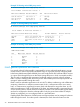
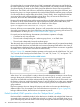
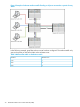
In Figure 2 (page 28), automatic fast-leave operates on the switch ports for IGMP clients "3A" and
"5A," but not on the switch port for IGMP clients "7A" and "7B," server "7C," and printer "7D."
Figure 2 Example of automatic fast-leave IGMP criteria
When client "3A" running IGMP is ready to leave the multicast group, it transmits a Leave Group
message. Because the switch knows that there is only one end node on port A3, it removes the
client from its IGMP table and halts multicast traffic (for that group) to port A3. If the switch is not
the Querier, it does not wait for the actual Querier to verify that there are no other group members
on port A3. If the switch itself is the Querier, it does not query port A3 for the presence of other
group members.
Fast-leave operation does not distinguish between end nodes on the same port that belong to
different VLANs. Thus, for example, even if all of the devices on port A6 in Figure 2 (page 28)
belong to different VLANs, fast-leave does not operate on port A6.
Default (enabled) IGMP operation solves the "delayed leave" problem
Fast-leave IGMP is enabled by default. When fast-leave is disabled and multiple IGMP clients are
connected to the same port on an IGMP device (switch or router), if only one IGMP client joins a
given multicast group, then later sends a Leave Group message and ceases to belong to that group,
28 Multimedia Traffic Control with IP Multicast (IGMP)