
Multicast and Routing Guide K/KA/KB.15.15


If a VLAN is configured with more than 32 subnets and it is necessary to apply VRRP to all of these
subnets, it is necessary to associate more than one VIP with a VR.
Because a VLAN on the routers supports up to 32 VRs, applying VRRP to a higher number of
subnets in the VLAN requires multiple VIPs in one or more VRs.
If the owner of a VR is associated with multiple VIPs, the backup routers belonging to the same VR
must also be associated with the same set of VIPs. If the VIPs on the owner are not also on the
backups, a misconfiguration exists. VRRP advertisement packets sent by the VR master will be
dropped by the VR backups because of a mismatch among VIPs.
Dynamically changing the priority of the VR
The dynamic priority change feature provides the ability to dynamically change the priority of the
virtual router (VR) when certain events occur. The backup VR releases VIP control by reducing its
priority when tracked entities such as ports, trunks, or VLANs go down. You can also force the
backup to take ownership of the VR if you have previously caused it to release control.
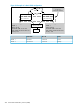
In normal VRRP operation, one router (Router-1) is in the master state and one router (Router-2) is
in the backup state. Router-1 provides the default gateway for the host. If Router-1 goes down for
any reason, the backup router, Router-2, provides the default gateway for the host.
Figure 55 Example VRRP configuration
If all the tracked entities configured on Router-1 go down, Router-1 begins sending advertisements
with a priority of zero. This causes Router-2 to take control of the virtual IP.
Any applications or routing protocols, such as RIP or OSPF, on Router-1 that were using its IP
address are no longer able to use that IP interface. Router-1 does not respond to any ARP requests
for that IP address. Router-2 takes control of the IP address and responds to ARP requests for it with
the virtual MAC address that corresponds to VRID-1.
NOTE: A backup VR switches to priority zero instead of its configured value when all of its tracked
entities go down. An owner VR always uses priority 255 and never relinquishes control voluntarily.
Failover operation
Failover operation involves handing off the VR's control of the virtual IP to another VR. Once a
failover command is issued, the VR begins sending advertisements with priority zero instead of the
configured priority. When the VR detects a peer VR taking control, it releases control of the virtual
IP and ceases VR operation until a failback is executed. Failover occurs on only a backup VR
operating as master.
If you specify the with-monitoring option, the VR continues to monitor the virtual IP after ceasing
VR operation. If the master VR goes down, it then retakes control of the virtual IP.
284 Virtual Router Redundancy Protocol (VRRP)