
Multicast and Routing Guide K/KA/KB.15.15
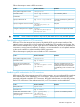
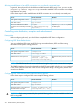
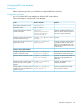

RemarksUse the command...To do...
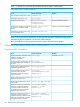
show ip bgp regex reg-exDisplay all routes whose AS_PATH
matches the regular-expression given
show ip bgp
[ipv4-addr|masklen[longer-prefix]]
route community
Display basic route information
(destination and nexthop) and the
communities tagged to the route in full
show ip bgp neighbor
[ip4-addr]
Display BGP peer information
show ip bgp summaryDisplay in brief the BGP neighbor
information
show ip bgp as-pathDisplay the list of AS_PATH that BGP
has learned from the routing
information it has received
show ip bgp redistributeDisplay the list of protocols whose
routes are being redistributed into BGP
BGP configuration examples
BGP basic configuration
Network requirements
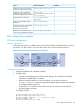
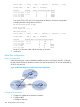
In the following network, run eBGP between Switch A and Switch B and iBGP between Switch B
and Switch C so that Switch C can access the network 8.1.1.0/24 connected to Router A.
Figure 61 Network diagram for BGP basic configuration
Configuration procedure
1. Configure IP addresses for interfaces (omitted.)
2. Configure iBGP.
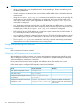
• To prevent route flapping caused by port state changes, this example uses loopback
interfaces to establish iBGP connections.
• Because loopback interfaces are virtual interfaces, you need to use the peer
connect-interface command to specify the loopback interface as the source interface
for establishing BGP connections.
• Enable OSPF in AS 65009 to ensure that Switch B can communicate with Switch C
through loopback interfaces.
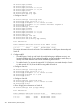
# Configure Switch B
HP Switch(config)# router bgp 65009
HP Switch(bgp)# bgp router-id 2.2.2.2
HP Switch(bgp)# neighbor 3.3.3.3 remote-as 65009
HP Switch(bgp)# exit
HP Switch(config)# router ospf
BGP configuration examples 317