
Multicast and Routing Guide K/KA/KB.15.15
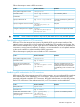
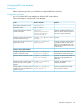
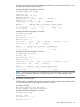

Status codes: * - valid, > - best, i - internal, e - external, s - stale
Origin codes: i - IGP, e - EGP, ? - incomplete
Network Nexthop Metric LocalPref Weight AsPath
---------------------------------------------------------
*>e 2.2.2.2/32 3.1.1.1 0 0 65009?
*>e 3.1.1.0/24 3.1.1.1 0 0 65009?
*>e 8.1.1.0/24 0 0 65008i
*>e 8.1.1.0/24 0 0 65008i
Two routes 2.2.2.2/32 and 9.1.1.0/24 have been added in Switch A’s routing table.
# Display the BGP routing table on Switch C.
HP Switch(config)# show ip bgp
Local AS : 65009
Local Router-id : 3.3.3.3
BGP Table Version : 1
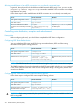
Status codes: * - valid, > - best, i - internal, e - external, s - stale
Origin codes: i - IGP, e - EGP, ? - incomplete
Network Nexthop Metric LocalPref Weight AsPath
-------------------------------------------------------
*>e 2.2.2.2/32 9.1.1.1 0 100 I
*>e 3.1.1.0/24 9.1.1.1 0 100 I
*>e 8.1.1.0/24 0 0 65008i
*e 9.1.1.0/24 0 0 65008i
*>e 9.1.1.0/24 0 0 65008i
Route 8.1.1.0 becomes valid with the next hop as Switch A.
5. Verification.
Route filter configuration
Network requirements
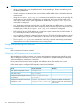
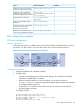
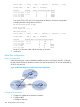
In the following figure, Switch B establishes eBGP connections with Switch A and C. Configure
the No_Export community attribute on Switch A so that routes from AS 10 are not advertised by
AS 20 to any other AS.
Figure 62 Network diagram for BGP community configuration
Configuration procedure
1. Configure IP addresses for interfaces (omitted.)
2. Configure eBGP.
# Configure Switch A.
320 Border Gateway Protocol (BGP)