
Multicast and Routing Guide K/KA/KB.15.15

3. Configure the BGP community.
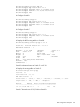
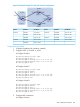
# Configure a routing policy.
route-map bgp-out permit seq 10
HP Switch(route-map-bgp-out)# set community no-export
HP Switch(route-map-bgp-out)# exit
# Apply the routing policy.
HP Switch(config)# bgp 10
HP Switch(bgp)# neighbor 200.1.2.2 route-map bgp-out out
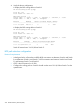
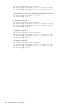
# Display the route on Switch B.
HP Switch(config)# show ip bgp 9.1.1.0/24
Local AS : 20 Local Router-id : 2.2.2.2
BGP Table Version : 3
Network : 9.1.1.0/24 Nexthop : 200.1.2.1
Peer : 200.1.2.1 Origin : igp Metric : 0 Local Pref : Weight
: 0 Calc. Local Pref : 100
Valid : Yes Type : external
Stale : No
Best : Yes (Only Route Available) AS-Path : 100
Communities: no-export
# Display the routing table on Switch C.
HP Switch# show ip bgp 9.1.1.0/24
The route 9.1.1.0/24 is not available in the routing table of Switch C.
BGP route reflector configuration
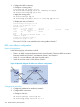
Network requirements
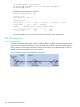
In the following figure, all switches run BGP.
• There is an eBGP connection between Switch A and Switch B. There are iBGP connections
between SwitchB and Switch C, and between Switch C and Switch D.
• Switch C is a route reflector with clients Switch B and D.
• Switch D can learn route 1.0.0.0/8 from Switch C.
Figure 63 Network diagram for BGP route reflector configuration
Configuration procedure
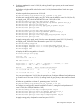
1. Configure IP addresses for interfaces (omitted.)
2. Configure BGP connections.
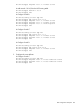
# Configure Switch A.
HP Switch(config)# router bgp 100
HP Switch(bgp)# bgp router-id 1.1.1.1
322 Border Gateway Protocol (BGP)