
Multicast and Routing Guide K/KA/KB.15.15
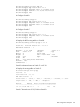
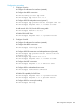
3. Configure Switch C.
# Configure IP addresses for interfaces (omitted.)
# Configure the iBGP connection.
HP Switch(config)# router bgp 65009
HP Switch(bgp)# bgp router-id 3.3.3.3
HP Switch(bgp)# neighbor 9.1.1.1 remote-as 65009
# Configure BGP to redistribute direct routes.
HP Switch(bgp)# redistribute connected
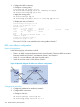
BGP Configuration Example
# Enable GR for BGP Peer.
HP Switch(bgp)# neighbor 9.1.1.1 graceful-restart
Verification
After completing the above configuration, perform an active/standby switchover on Switch B.
Switch A and Switch C should be able to ping each other without any packet drops. Also ensure
that there are no flaps of BGP learned routes on the peer switches.
BGP show routines
Synopsis:
show ip bgp [ipv4-addr [mask] [longer-prefixes]]
Displays information about BGP routes installed in the BGP routing information base
(RIB.)
ipv4-addr IP address entered to filter the output to display only a
particular host or network in the BGP routing table.
mask Mask to filter or match hosts that are part of the specified
network.
longer-prefixes If a prefix is specified, optionally specify to show routes
matching the specified Network/Mask pair only.
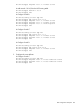
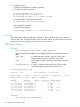
HP Switch(bgp)# show ip bgp
Local AS : 100 Local Router-id : 10.0.102.138
Status codes: * - valid, > - best, i - internal, e - external, s - stale
Origin codes: i - IGP, e - EGP, ? - incomplete
Network Nexthop Metric LocalPref Weight AsPath
--------------------------------------------------------------
* e 11.0.0.0/8 10.0.102.40 0 0 200 ?
*>e 11.0.0.0/8 10.0.102.153 0 0 200 i
*>e 22.0.0.0/8 10.0.102.40 0 0 200 ?
* e 22.0.0.0/8 10.0.102.198 0 0 300 500 ?
*>e 33.0.0.0/8 10.0.102.40 0 0 200 ?
* e 33.0.0.0/8 10.0.102.198 0 0 300 400 ?
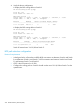
Synopsis:
show ip bgp ipv4-addr/masklen
330 Border Gateway Protocol (BGP)