
Multicast and Routing Guide K/KA/KB.15.15
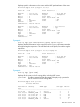
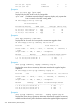
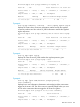
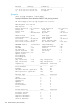
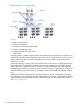
You have the alternative of using static routes or BGP to connect to your service provider. For
multi-homing or policy control, you can choose to deploy BGP. This may be used for internet
connectivity. Foundation iBGP solutions do not carry full internet routing tables, so the diagram
above requires that 1) only default routes are taken from the internet and 2) multiple VRF instances
do not exist at a single physical remote site.
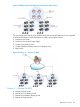
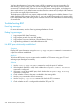
The deployment of device A may require additional traffic shaping and scalability features. If you
prefer extending BGP routing to devices B or C, you can use BGP functionality on a routing switch.
In this deployment model, the routing switch would be used for route redistribution and the marking
of communities.
Troubleshooting BGP
Event log messages
For more information, see the Event Log Message Reference Guide.
Debug log messages
1. Logs per-peer BGP State Transitions.
2. Logs per-peer arrivals of a new BGP update.
3. Logs per-peer Time-outs (Hold-time, Graceful Restart Timeout.)
4. Logs Memory problems in case buffer-allocations fail.
No BGP peer relationship established
Symptom
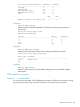
Display BGP peer information using the show ip bgp neighbor command. A connection to
a peer has not been established.
Analysis
To become BGP peers, any two routers need to establish a TCP session using port 179 and
exchange open messages successfully.
Solution
1. Use the show ip bgp neighbor command to verify the peer’s IP address.
2. If the loopback interface is used, check whether the neighbor connect interface
command is configured.
3. If the peer is a non-direct eBGP peer, check whether the neighbor ebgp multihop
command is configured.
4. Check whether a route to the peer is available in the routing table.
5. Use the ping command to check connectivity.
6. Use the display tcp status command to check the TCP connection.
7. Check whether an ACL is configured that disables TCP port 179.
338 Border Gateway Protocol (BGP)