
Multicast and Routing Guide K/KA/KB.15.15
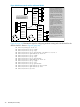
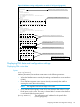
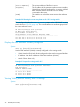
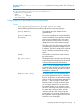
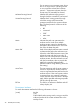
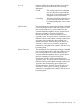
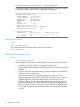

Figure 8 Multicast network with a multinetted VLAN
8212zl #3
VLAN 25
10.38.10.3
10.38.30.1
10.38.31.1
VLAN 28
10.28.30.1
VLAN 30
10.30.229.2
8212zl #1
VLAN 25
10.38.10.1
10.38.11.1
10.38.12.1
VLAN 27
10.27.30.1
VLAN 29
10.29.30.1
8212zl #2
VLAN 25
10.38.10.2
10.38.20.1
10.38.21.1
VLAN 29
10.29.30.2
VLAN 30
10.30.229.1
On the three routing switches,
VLAN 25 is multinetted with
subnets that match in only one
instance. Since subnet 10.38.10.x
exists on VLAN 25 in all routing
switches, it serves as the source
IP address for multicast traffic
outbound on VLAN 25 for the
network.
The remaining VLANs (27, 28,
29, and 30) in the network are not
multinetted on the routing
switches and it is not necessary to
configure a source address for
multicast routing on these other
VLANs.
In this example, the multicast
source transmits packets with a
TTL (time-to-live) of 192. To
prevent these packets from
moving beyond routers 2 and 3,
you would configure the TTL in
the downstream routers (below
routers 2 and 3) at 190. (It is not
necessary to configure the TTL
on routers 1 - 3.)
Video
Server
Note the common subnet
instance in (multinetted)
VLAN 25 (10.38.10.x).
Downstream
Routers
Downstream
Routers
Figure 8 (page 44) illustrates the steps for configuring multicast routing at the VLAN level for the
8212zl switch #1 shown in Figure 8 (page 44).
HP Switch(config)# vlan 25
HP Switch(vlan-25)# ip igmp
HP Switch(vlan-25)# ip rip
HP Switch(vlan-25)# ip pim-dense ip-addr 10.38.10.1
HP Switch(vlan-25-pim-dense)# vlan 27
HP Switch(vlan-27)# ip igmp
HP Switch(vlan-27)# ip rip
HP Switch(vlan-27)# ip pim-dense
HP Switch(vlan-27-pim-dense)# vlan 29
HP Switch(vlan-29)# ip igmp
HP Switch(vlan-29)# ip rip
HP Switch(vlan-29)# ip pim-dense
HP Switch(vlan-29-pim-dense)# write mem
HP Switch(vlan-29-pim-dense)# exit
HP Switch(vlan-29)# exit
44 PIM-DM (Dense Mode)