
Multicast and Routing Guide K/KA/KB.15.15
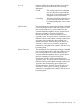

[Source Address] The unicast address of the flow's source.
[neighbor] The IP address of the upstream multicast router interface
(VLAN) from which the multicast flow is coming. A blank
field indicates that the multicast source is directly
connected to the router.
[VLAN] The interface on which the router receives the multicast
flow.
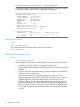
Example 20 Showing the route entry data on the “#2” routing switch
The next figure displays the show ip mroute output on the “8212zl #2” routing
switch shown in Figure 8 (page 44). This case illustrates two multicast groups from
the same multicast source.
HP Switch(config)# show ip mroute
IP Multicast Route Entries
Total number of entries : 2
Group Address Source Address Neighbor VLAN
--------------- --------------- --------------- ----
239.255.255.1 10.27.30.2 10.29.30.1 29
239.255.255.5 10.27.30.2 10.29.30.1 29
Displays the PIM interfaces currently configured
Syntax
show ip [mroute] [interfacevid]
Lists the PIM interfaces (VLANs) currently configured in the routing switch.
• VLAN: Lists the VID of each VLAN configured on the switch to support PIM-DM.
• IP Address: Lists the IP addresses of the PIM interfaces (VLANs.)
• Mode: Shows dense only.
Example 21 Output for routing switch “#1”
HP Switch(config)# show ip mroute interface
PIM Interfaces
VLAN IP Address Mode
---- --------------- ------------
25 10.38.10.1 dense
27 10.27.30.1 dense
29 10.29.30.1 dense
Viewing VLAN, protocol identity, and TTL settings
Syntax:
show ip [mroute] [interface vid]
46 PIM-DM (Dense Mode)