
Multicast and Routing Guide K/KA/KB.15.15
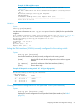
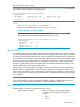

Example 24 PIM neighbor output
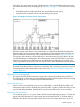
This example simulates output from routing switch “#1” in Figure 8
(page 44).
The data identifies the first downstream neighbor (“routing switch
#2”.)
HP Switch(config)# show ip pim neighbor
PIM Neighbors
IP Address VLAN Up Time (sec) Expire Time (sec)
--------------- ---- ------------------ ------------------
10.29.30.2 29 196 89
Variation
Syntax:
Show ip pim [neighbor]
Lists the same information as show ip pim neighbor found on (LINK) for the specified PIM
neighbor:
This example simulates output from routing switch “#1” in Figure 8 (page 44).
The data is from the first downstream neighbor ( routing switch “#2”.)
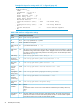
HP Switch(config)# show ip pim neighbor 10.29.30.2
PIM Neighbor
IP Address : 10.29.30.2
VLAN : 29
Up Time (sec) : 26
Expire Time (sec) : 79
Listing the PIM interfaces (VLANs) currently configured in the routing switch
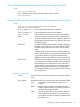
Syntax:
show ip pim [interface]
Lists the PIM interfaces (VLANs) currently configured in the routing switch.
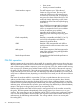
[VLAN] Lists the VID of each VLAN configured on the switch to support
PIM-DM.
[ip address] Lists the IP addresses of the PIM interfaces (VLANs.)
[mode] Shows dense only.
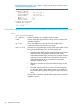
Example 25 Output for routing switch "#1" in Figure 8 (page 44)
HP Switch(config)# show ip pim interface
PIM Interfaces
VLAN IP Address Mode
---- --------------- ------------
25 10.38.10.1 dense
27 10.27.30.1 dense
29 10.29.30.1 dense
Viewing the current configuration for the specified VLAN (PIM interface)
Syntax:
show ip pim [interface [vid]]
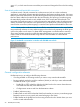
Displays the current configuration for the specified VLAN (PIM interface.) See Table 5
(page 52).
Displaying PIM data and configuration settings 51