
Multicast and Routing Guide K/KA/KB.15.15
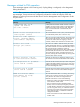
long to wait for the next hello packet from the router. If another packet does not
arrive within that time, the router removes the neighbor adjacency on that VLAN
from the routing table, which removes any flows running on that interface.
Shortening the hello interval reduces the hello hold time. This changes how quickly
other routers will stop sending traffic to the router if they do not receive a new hello
packet when expected. For example, if multiple routers are connected to the same
VLAN and the router requests multicast traffic, all routers on the VLAN receive that
traffic. (Those that have pruned the traffic will drop it when they receive it.) If the
upstream router loses contact with the router receiving the multicast traffic (that is,
fails to receive a hello packet when expected), the shorter hello interval causes it
to stop transmitting multicast traffic onto the VLAN sooner, resulting in less
unnecessary bandwidth use.
(Default: 30 seconds)
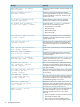
Changing the randomized delay setting for PIM-SM neighbor notification
Syntax:
ip pim-sparse hello-delay [0-5]
vlan [vid] ip pim-sparse hello-delay [0-5]
Changes the maximum time in seconds before the router actually transmits the initial
PIM hello message on the current VLAN. In cases where a new VLAN activates with
connections to multiple routers, if all of the connected routers sent hello packets at
the same time, the receiving router could become momentarily overloaded. This
value randomizes the transmission delay to a time between 0 and the hello delay
setting. Using 0 means no delay.
After the router sends the initial hello packet to a newly detected VLAN interface,
it sends subsequent hello packets according to the current Hello Interval setting.
Not used with the no form of the ip pim command.
(Default: 5 seconds)
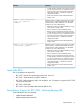
Enabling or disabling lan prune delay
Syntax:
[no] ip pim-sparse lan-prune-delay
[no]
vlan [vid] ip pim-sparse lan-prune-delay
Enables the LAN prune delay option on the current VLAN. With lan-prune-delay
enabled, the router informs downstream neighbors how long it will wait before
pruning a flow after receiving a prune request.
Other downstream routers on the same VLAN must send a join to override the prune
before the lan-prune-delay time if they want the flow to continue. This prompts
any downstream neighbors with multicast receivers continuing to belong to the flow
to reply with a join. If no joins are received after the lan-prune-delay period,
the router prunes the flow.
The propagation-delay and override-interval settings (below) determine
the lan-prune-delay setting.
Uses the no form of the command to disable the LAN prune delayoption.
(Default: Enabled)
VLAN context commands for configuring PIM-SM 69