
Multicast and Routing Guide K/KA/KB.15.15

Changing the Lan-prune-delay interval
Syntax:
ip pim-sparse propagation-delay [250-2000]
vlan [vid] ip pim-sparse propagation-delay [250-2000]
ip pim-sparse override-interval [500-6000]
vlan [vid] ip pim-sparse override-interval [500-6000]
A router sharing a VLAN with other multicast routers uses these two values to
compute the lan-prune-delay setting (above) for how long to wait for a PIM-SM
join after receiving a prune packet from downstream for a particular multicast group.
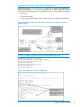
Example 32 Multiple routers sharing VLAN
A network may have multiple routers sharing VLAN "X." When an upstream router
is forwarding traffic from multicast group "X" to VLAN "Y," if one of the routers on
VLAN "Y" does not want this traffic, it issues a prune response to the upstream
neighbor. The upstream neighbor then goes into a prune pending state for group
"X" on VLAN "Y." (During this period, the upstream neighbor continues to forward
the traffic.) During the pending period, another router on VLAN "Y" can send a
group "X" join to the upstream neighbor. If this happens, the upstream neighbor
drops the prune pending state and continues forwarding the traffic. But if no routers
on the VLAN send a join, the upstream router prunes group "X" from VLAN "Y"
when the lan-prune-delay timer expires.
(Defaults: propagation-delay = 500 milliseconds; override-interval =
2500 milliseconds)
Neighbor timeout
Syntax:
ip pim-sparse nbr-timeout [60-65536]
Changing the DR priority
Syntax:
ip pim-sparse dr-priority [0-4294967295]
This command changes the router priority for the DR election process in the current
VLAN. A numerically higher value means a higher priority. If the highest priority is
shared by multiple routers in the same VLAN, the router with the highest IP address
is selected as the DR.
A 0 (zero) value disables DR operation for the router on the current VLAN.
(Range: 0 - 2147483647; Default: 1)
Configuring PIM-SM support in a VLAN context
PIM-SM support must be configured in each VLAN where you want PIM-SM forwarding of multicast
traffic. This illustrates the following per-VLAN configuration steps:
• Enabling PIM-SM on VLAN 120 and allowing the default any option to select a source IP
address for PIM-SM packets forwarded from this VLAN. (Because the VLAN in this example
70 PIM-SM (Sparse Mode)