
Multicast and Routing Guide K/KA/KB.15.15
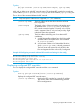
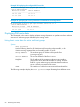

[no] bsr-candidate bsm-interval [5-300]
Specifies the interval in seconds for sending periodic RP-Set messages on all PIM-SM
interfaces on a router operating as the elected BSR in a domain.
NOTE: This setting must be smaller than the rp-candidate hold-time settings
(range of 30 to 255; default 150) configured in the RPs operating in the domain.
(Default: 60; Range 5–300)
Configuring C-RPs on PIM-SM routers
An RP candidate advertises its availability, IP address, and the multicast group or range of groups
it supports. The commands in this section are used to configure C-RP operation. The sequence of
steps is as follows:
1. Specify the source IP VLAN.
2. Enable C-RP operation.
3. Option: enable or disable specific multicast address groups.
NOTE: Before configuring BSR, RP, and SNMP trap operation for PIM-SM, it is necessary to
enable PIM-SM on at least one VLAN on the router.
Specifying the source IP VLAN (optionally configuring multicast groups or range of
groups)
Specifying the source IP VLAN ID automatically configures the C-RP to support all multicast
groups (unless you include an individual group or range of groups in the command.) The
recommended approach is to allow all multicast groups unless you have a reason to limit the
permitted groups to a specific set.
Syntax:
[no] rp-candidate source-ip-vlan [vid] [group-prefix
group-addr/mask]
[no] router pim rp-candidate source-ip-vlan [vid] [group-prefix
group-addr/mask]
These commands configure C-RP operation in the following way:
• Specify the VLAN interface from which the RP IP address will be selected for advertising the
router as an RP candidate.
NOTE: Only one VLAN on the router can be configured for this purpose at any time.
• Enable the router as an RP candidate.
• Specify the multicast groups for which the router is a CRP. (Default: Disabled.)
NOTE: When executed without specifying a multicast group or range of groups, the resulting
RP candidate defaults to allow support for all multicast groups — 224.0.0.0, 240.0.0.0, or
224.0.0.0/4.
Configuring C-RPs on PIM-SM routers 73