
Multicast and Routing Guide K/KA/KB.15.15
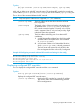
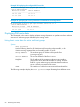

Syntax:
[no]rp-candidate
Enables C-RP operation on the router. Requires that the source IP VLAN is currently
configured, but disabled.
The no form of the command disables the currently configured C-RP operation, but
does not change the configured C-RP settings.
Adding or deleting a multicast group address
Use this command if you need to modify the multicast address group configuration for a C-RP on
the router.
Syntax:
[no]rp-candidate group-prefix [ group-addr | group-mask ]
Adds a multicast group address to the current C-RP configuration. Requires that the
source IP VLAN (See 73) is already configured. The no form of the command
removes a multicast group address from the current C-RP configuration.
This command does not enable or disable RP candidate operation.
NOTE: An RP candidate supports up to four separate multicast address groups.
If only one group-prefix address exists in the router PIM configuration, you cannot
delete it unless you first add another group-prefix address.
Changing the C-RP hold-time
Hold-time is included in the advertisements the C-RP periodically sends to the domain's elected
BSR, and updates the BSR on how long to wait after the last advertisement from the reporting RP
before assuming that it has become unavailable.
Syntax:
rp-candidate hold-time [30-255]
Changes the hold time a C-RP includes in its advertisements to the BSR. Also, if C-RP
is configured, but disabled, this command re-enables it.
(Default: 150 seconds; Range: 30–255 seconds.)
Changing a C-RP's election priority
This priority is significant when multiple C-RPs in a given domain are configured to support one or
more of the same multicast groups.
Syntax:
rp-candidate priority [0-255]
Changes the current priority setting for a C-RP. Where multiple C-RPs are configured
to support the same multicast group(s), the candidate having the highest priority is
elected. Zero (0) is the highest priority, and 255 is the lowest priority.
(Default: 192)
Enabling, disabling, or changing router PIM notification traps
Syntax:
[no]router pim trap [ all | neighbor-loss | hardware-mrt-full
| software-mrt-full ]
Enabling, disabling, or changing router PIM notification traps 75