
Multicast and Routing Guide K/KA/KB.15.15

Syntax:
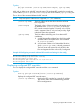
[no] rpf-override [source-ip-addr/mask-length] [rpf-ip-addr]
Add, edit, or delete up to eight RPF override entries. The multicast RPF override has a multicast
source address [source-ip-addr/mask-length] and an RPF address [rpf-ip-addr] pair.
The no form of the command deletes the RPF override.
NOTE: Only host-specific addresses are supported (i.e. “/32” addresses.)
[source-ip-addr] The IPv4 address of the host from which the multicast
flow originated.
[mask-length] The length, in bits, of the mask used to indicate the range
of addresses from [source-ip-addr] to which the
RPF override command applies. Currently, only a 32–bit
mask is supported, that is, only one host per entry. Eight
individual entries are supported.
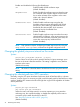
[rpf-ip-addr] The IPv4 address indicating one of two distinct RPF
candidates:
1. A valid PIM neighbor address from which forwarded
multicast traffic is accepted with a source address
of [source-ip-addr].
2. A local router address on a PIM-enabled VLAN to
which [source-ip-addr] is directly connected.
The local router will assume the role of DR for this
flow and registers the flow with an RP, if configured.
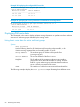
Example 38 Configuring a manual multicast RPF override and saving it in the config
HP Switch(config)# ip routing
HP Switch(config)# ip multicast-routing
HP Switch(config)# router pim
HP Switch(pim)# rpf-override 10.1.1.1/32 11.2.2.1
HP Switch(pim)# write mem
Displaying configured RPF overrides
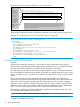
You can display the configured RPF overrides with the show command.
Syntax:
show ip pim rpf-override [source |source ip-address]
Displays the configured RPF override entries.
[source ip-address] Displays the RPF overrides for a specific IP address.
This can be useful when troubleshooting potential
RPF misconfigurations.
Displaying configured RPF overrides 79