
Multicast and Routing Guide K/KA/KB.15.15
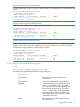
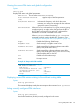
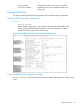
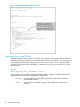

Example 48 Showing a PIM-SM interface configured on VLAN 1
HP Switch(config)# show ip pim interface 1
PIM Interface
VLAN : 1
IP Address : 10.1.10.1
Mode : sparse
Designated Router : 10.1.10.1
Hello Interval (sec) : 30
Hello Delay (sec) : 5
Override Interval (msec) : 2500 Lan Prune Delay : Yes
Propagation Delay (msec) : 500 Lan Delay Enabled : No
Neighbour Timeout : 180 DR Priority : 1
Displaying PIM neighbor data
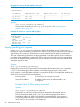
These commands enable listings of either all PIM neighbors the router detects or the data for a
specific PIM neighbor.
Syntax:
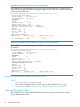
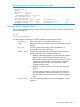
show ip pim neighbor
Lists PIM neighbor information for all PIM neighbors connected to the router:
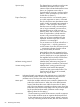
IP Address Lists the IP address of a neighbor multicast router.
VLAN Lists the VLAN through which the router connects to the indicated
neighbor.
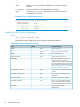
Up Time Shows the elapsed time during which the neighbor has
maintained a PIM route to the router.
Expire Time Indicates how long before the router ages-out the current flow
(group membership.) This value decrements until:
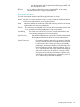
• Reset by a state-refresh packet originating from the upstream
multicast router. (The upstream multicast router issues
state-refresh packets for the current group as long as it either
continues to receive traffic for the current flow or receives
state-refresh packets for the current flow from another
upstream multicast router.
• Reset by a new flow for the current multicast group on the
VLAN.
• The timer expires (reaches 0.) In this case, the switch has
not received either a state-refresh packet or new traffic for
the current multicast group and ages-out (drops) the group
entry.
DR Priority Shows the currently configured priority for DR operation on the
interface.
Displaying PIM neighbor data 87