
Multicast and Routing Guide K/KA/KB.15.15
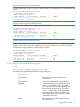
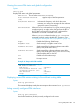

Example 49 Listing of all PIM neighbors detected
HP Switch(config)# show ip pim neighbor
PIM Neighbors
IP Address VLAN Up Time (sec) Expire Time (sec) DR Priority
--------------- ---- ---------------- ---------------- ----------
10.10.10.2 100 348 90 1
10.20.10.1 200 410 97 1
Syntax:
show ip pim neighbor [ip-address]
Lists the same information as show ip pim neighbor. See “Displaying PIM
neighbor data” (page 87).
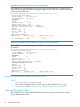
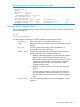
Example 50 Output for a specific PIM neighbor
HP Switch(config)# show ip pim neighbor 10.10.10.2
PIM Neighbor
IP Address : 10.10.10.2
VLAN : 100
Up Time (sec) : 678
Expire Time (sec) : 93
DR Priority : 1
Display pending join requests
Use the show ip pim pending command to display the pending joins on a PIM router. A
pending join can be an IGMPv2 join (host join) or PIM (*,G) or (S,G) join (PIM router joins, PIM-SM
only) received by a router for which there is no active multicast flow to satisfy the received join.
This aids in determining what flows are being requested on the PIM network, but for which there
is no data. If data availability is expected for a flow, and a join for that flow is showing as pending,
this moves the troubleshooting search to the source of the flow since the routers are verified to be
seeing the request for data.
Syntax:
show ip pim pending [ip-address]
Displays the joins received on the switch from downstream devices that want to join a specified
(*,G) or (S,G) multicast group (flow) address or all multicast groups known on the switch.
A join remains in a pending state until traffic is received for the flow. The VLAN (PIM interface) on
which each join was received is also displayed.
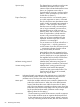
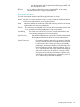
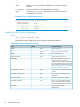
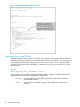
Incoming VLAN ID on which a join request is received.
Source IPv4 Address IP address of the source of multicast traffic in an
(S,G) group.
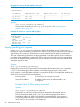
Example Show IP PIM pending command
Syntax:
show ip pim rp-pending [ip-address]
Displays the joins received on the switch from downstream devices that want to
listen to the multicast traffic in all (*,G) or (S,G) multicast groups (flows) that a
specified RP address or all RPs in the domain are responsible for. A join remains
in a pending state until traffic is received for the flow. The VLAN (PIM interface) on
which each join was received is also displayed.
88 PIM-SM (Sparse Mode)