
HP Installation Guide, HP AT094A PCIe 2P 8Gb FC and 2P 1/10GbE Adapter, Edition 2




1 Introduction
Overview
The HP AT094A PCIe 2P 8Gb FC and 2P 1/10GbE Adapter is a dual port 8Gb FC and 1/10GbE
adapter for the HP Integrity rx2800 i2 and Superdome2 systems. The HP Product number is AT094A.
These two descriptions refer to the same device and are used interchangeably throughout this
document.
The AT094A adapter uses the BladeEngines 3 (BE3) Emulex chip that provides 10 Gigabit Ethernet
functionality and the Emulex 8 Gigabit Fibre Channel Controller. This latest I/O card is ideal for
virtualization and consolidation by providing a high speed, low latency connection to networking
and storage infrastructure.
For more information about the HP AT094A PCIe 2P 8Gb FC and 2P 1/10GbE Adapter, see the
following HP website:
http://www.hp.com/go/hpux-11iv3-iocards-manuals
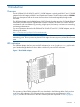
NOTE: The two ports closest to the PCIe edge connector (bottom two as in Figure 1) are the
Networking ports. The two ports away from the PCIe edge connector (top two) are the Fibre Channel
ports.
LED indicators
The AT094A adapter has four ports with LED indicators for Link (L) and Activity (A) for each
port. Standard-height bracket is shown below with the LC ports and LED indicators.
Figure 1 The AT094A adapter
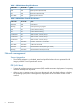
The operation of the AT094A adapter LED's are described in the following tables. Each port has
a set of two LED indicators. LED indicators for the networking ports are explained in Table 1
(page 6) and the LED indicators for the Fibre Channel ports are explained in Table 2 (page 6).
Overview 5