
HP Installation Guide, HP PCIe 2 port (AT111A/CN1100E) FlexFabric Adapter, Edition 2


8. Attach the media:
a. For fiber optic cable connections:
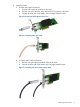
1. Insert the SFP transceiver module into the cage.
2. Connect one end of the fiber optic cable to the LC connector on the CNA.
3. Connect the other end of the cable to the Converged Network switch.
Figure 5 Emulex CNA with optical transceivers
Figure 6 Connecting fiber optic cable
b. For Direct Attach cable connections:
1. Connect one end of the Direct Attach cable to the CNA.
2. Connect the other end of the cable to the Converged Network switch.
Figure 7 Connecting the direct attach copper cable
Installing the Emulex CNA 9