
- Hewlett-Packard Broadband Service Analyzer User's Guide




1-15
Setting Up the Analyzer
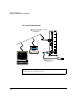
To Connect the Analyzer to a Computer
1 Setting Up the
Analyzer
13 To print help topics, set up the current printer for the help viewer
using the Printer Setup option in the File menu. For more information
see the How to use Help option in the Help menu in the help viewer.
To Record the System Administration Information
1 Switch on the analyzer (see “To Switch the Analyzer On and Off” on
page 1-22).
2 Log in to the analyzer using the following user name and password.
See “To Log In to the Analyzer” on page 2-11.
3 After you have connected the analyzer, use the system administration
functions of the analyzer to set the
• system administrator password (see “To Change a Password” on
page 4-6)
• required users (see User Online Help)
• date, time, and time zone (see “To Set the System Date, Time, and
Time Zone” on page 4-7)
• printer (see User Online Help)
• remote hosts (see User Online Help)
• routing details (see User Online Help)
• remote file systems (see User Online Help)
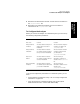
Note The HP Broadband Service Analyzer has two sets of default login information:
Note You must have the appropriate privileges to perform system administration
functions.
• User Name—root
• User Name—boomer
Password—rootpasswd
Password—broadband