
- Hewlett-Packard Broadband Service Analyzer User's Guide




Setting Up the Analyzer
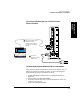
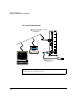
To Connect the Analyzer to a Computer
1-16
To Connect the Analyzer Using a Modem
You can use a modem (configured to no parity, 8 data bits, 1 stop bit) to
remotely access the analyzer from the notebook PC. You should use a
modem connection only to access the Tcl interface.
You can set up a modem connection using either:
• an external modem
• a PCMCIA internal modem
To connect the analyzer using a modem, complete the following steps:
1 If you are using the PCMCIA internal modem, change the COM port
assignments for the notebook PC.
2 Connect the analyzer.
3 Set the remote modem to auto answer.
4 Set up the modem connection.
5 Record the system administration information.
To Change the COM Port Assignment
1 From the Main program group, click the Control Panel icon.
2 Click the OmniBook icon. The OmniBook Configuration window is
displayed.
3 Click the Change button in the COM Port Assignments area. The Select
COM Port Assignments window is displayed.
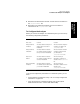
4 Set the serial port to COM4 by clicking COM4 in the Serial Port
column; then click OK.