
- Hewlett-Packard Broadband Service Analyzer User's Guide





2-5
Using the Analyzer
To Connect to the System Under Test
2 Using the Analyzer
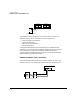
A typical application for this type of test connection is testing the
integrity of the system under test. The remote loopback test connection is
similar to the network element test connection in its uses. However, while
the network element connection tests a single element at a time, the
remote loopback connection tests all network elements in the loop. Use
this connection to monitor, capture, and transmit traffic.
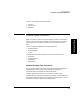
The main uses for this type of connection are to test
• continuity
• mean cell delay
• loop cell loss
Typically, you use a network element test connection to test any new
element you add to the network. When the element passes all relevant
tests, you change to the remote loopback test connection, and test to see
what effect the new element is having on the other network elements in
the loop. You can also use this test to identify a problem with a system
that is offline.
Configure the affected port(s) for full duplex for this type of test
connection.
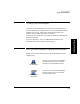
In-line Test Connection
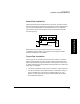
The in-line test connection is an intrusive system connection. A typical
application for the in-line test connection is testing equipment when it is
being installed. Using this connection, you don’t need to complicate your
test with optical or electrical splitters and T-pieces.
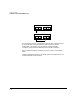
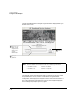
The loop through interface configuration is another type of in-line test
connection.
Port 1
Port 2
Equipment under test
Tx
Rx
Tx
Rx