
- Hewlett-Packard Broadband Service Analyzer User's Guide






Using the Analyzer
To Log Out from the Analyzer
2-16
To Log Out from the Analyzer
If you are logging alarms and errors when you log out, the analyzer
displays a message reminding you that you are still logging. When you exit
the analyzer, logging stops.
1
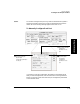
From the File
menu, select
Exit.
2
Click Yes.
or
1
Double-click
the Control-
menu box.