
- Hewlett-Packard Broadband Service Analyzer User's Guide





Using the Analyzer
To Run SMARTtests and Predefined Macros
2-36
To Run SMARTtests and Predefined Macros
The analyzer provides a number of SMARTtests and predefined macros to
help you perform routine tasks.
SMARTtests
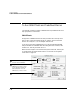
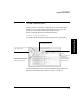
Simply select a SMARTtest from the Test pull-down list at the top of the
main screen, change any default values you require, and click the Start
button. It’s as easy as 1, 2, 3; the analyzer does the rest.
If you are not sure which SMARTtest to run, see the User Online Help.
Help is available for all SMARTtests describing what each one does, who
should run it, and why and when to run it.
Make sure the analyzer is connected to the system under test, and the port
is configured for full duplex mode. Refer to “To Connect to the System
Under Test” on page 2-2.
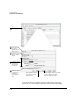
1
Select the transmit and receive
connection for the SMARTtest.
2
Change the default values to run the
SMARTtest in the way you want.
You can change the criteria and
traffic profile; then re-run the
SMARTtest any number of times.
3
Click the Start button.