
HP FlexFabric 11900 Switch Series Installation Guide


95
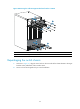
Figure 60 Removing the cable management brackets from the 11908-V
(1) Loosen the screws that attach the cable management brackets to the chassis.
(2) Remove the cable mana
g
ement brackets.
Repackaging the switch chassis
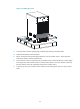
1. As shown in Figure 61, align the screw holes on the two sides of the chassis bottom to the L-type
brackets on the pallet base of the wooden carton.
2. Screw in the screws shipped with your switch and fasten.