
HP FlexFabric 11900 Switch Series Installation Guide



16
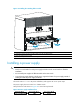
Figure 12 Attaching L-shaped brackets with wall anchors
(1) Fastenin
g
screw
(2) L-shaped bracket
(3) Wall anchor
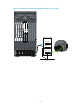
Grounding the switch
CAUTION:
Before using the switch, connect the grounding cable changely to guarantee lightning protection and
anti-interference of the switch.
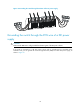
Grounding the switch with a grounding strip
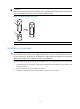
CAUTION:
• Use the supplied grounding cable (yellow-green grounding cable).
• Connect the
g
roundin
g
cable to the earthin
g
system in the equipment room. Do not connect it to a fire
main or lightning rod.
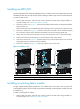
If a grounding strip is available at the installation site, connect the grounding cable through the
grounding strip.
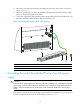
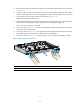
To connect the grounding cable:
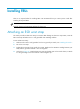
1. Unpack the grounding cable.
The grounding cable provided with the switch is compliant with the NEBS standards.